

















WCS is not one mod. It is short for Worst Case Scenario, an author on the Arma Reforger Workshop, and it names the family of mods that author publishes, all with names that start with WCS_. To run them, add the part you want and the parts it needs. The parts below are at version 8.3.0, except WCS_VehicleLock at 8.1.0, and the Workshop lists them as built for game version 1.8.0.13.
The parts
These are the WCS mods the Workshop shows as published by Worst Case Scenario. Search the Workshop for WCS to see more, including mods by other people that build on WCS.
| Mod | ID | Size | What its page says | Needs |
|---|---|---|---|---|
WCS_Core | 64610AFB74AA9842 | 1.0 MB | “Internal core framework and essential assets required for all WCS server mods to function properly.” | Nothing |
WCS_Armaments | 629B2BA37EFFD577 | 433.8 MB | “The WCS Armament addon introduces a robust weapon system for vehicles in Arma Reforger.” Its page says documentation is coming soon. | Nothing |
WCS_SpaceCore | 5E389BB9F58B79A6 | 28.3 MB | Credits SpaceStrider for the original SpaceCore. | WCS_Armaments |
WCS_VehicleLock | 61BA4EB5C886D396 | 712.35 KB | “A robust lock and unlock system for vehicles.” Version 8.1.0. | Nothing listed |
WCS_Vehicles | 615A80027C5C9170 | 9.8 MB | “Ground vehicle configs for the WCS Servers.” Thanks RHS for their Status Quo mod. | WCS_VehicleLock, WCS_Armaments and WCS_Core |
The Workshop also shows separate WCS vehicle mods, also at version 8.3.0: WCS_Stryker (68.1 MB), WCS_JLTV (95.2 MB), WCS_M1A1 (112.2 MB), WCS_BMP-3 (60 MB) and WCS_T-72 (94.6 MB). Their dependency lists were not read here, so open each one’s page and read its Dependencies before you add it. By default the panel adds only the mod you choose; the game downloads the mods it needs at each start, and the row says “Needs {names}, which the game downloads with it.” To put the needed mods on the list too, turn on Add dependencies too before you add.
If you only want WCS to be there because another mod needs it, you do not choose the parts yourself. Add the other mod. The panel lists what it needs (the “{count} needed” button and the Dependencies tab) and the game downloads it at start.
In the ArthOS panel
- Open the Mods tab, then the Workshop tab (1).
- Search for the mod you want (2), for example
WCS. The cards show the WCS family. - Open a card to read what it needs. Choose Add on the card. Only that mod is added, unless Add dependencies too (3) is on; then each needed mod is added with it. The dialog shows each needed mod as “On this server”, “Downloaded with it” or “Added with it”.
- Check the mod’s row on On this server: its “Needs” line, or the Dependencies tab, names each part it needs. Those parts are rows on the list only if Add dependencies too was on.
- Restart the server. A change to the mod list takes effect at the next restart. See restart your server.
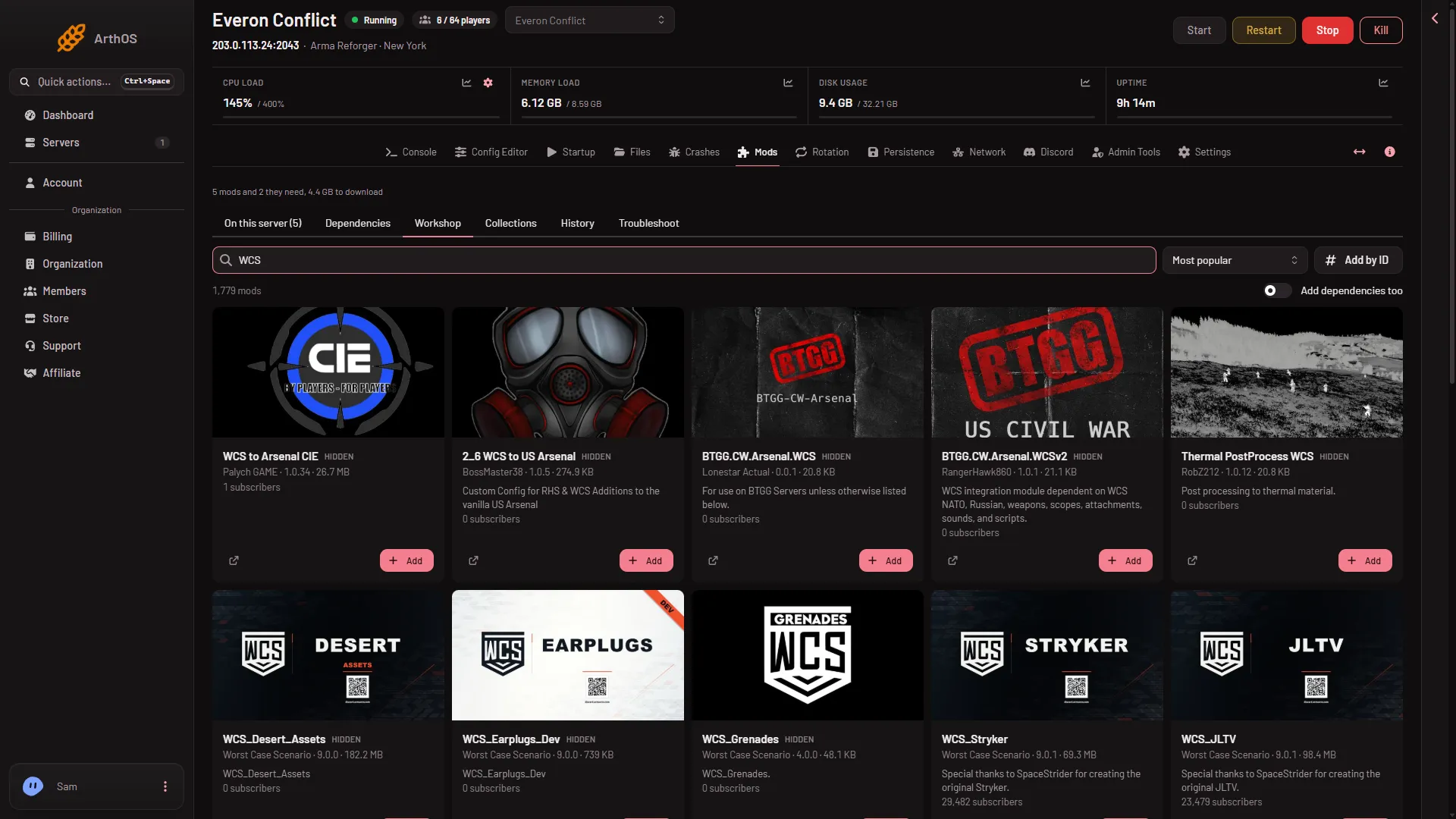
- Workshop tab
- Search the Workshop
- Add dependencies too
By hand
In config.json, each mod is an object in game.mods. The order of the objects is the load order, so put the parts a mod needs above it:
"mods": [
  { "modId": "64610AFB74AA9842", "name": "WCS_Core", "version": "8.3.0" },
  { "modId": "629B2BA37EFFD577", "name": "WCS_Armaments", "version": "8.3.0" }
]
Add the rest of the chain it needs in the same way, then save and restart. Bohemia’s server documentation says a mod listed in game.mods is downloaded and activated by players when they join. Keep the file valid JSON. The panel repairs common mistakes such as a trailing comma at the next start, but do not rely on it.
Things to know before you add them
- Size.
WCS_Armamentsis 433.8 MB. Players download it when they join, so it adds to the join time. Console players have a mod storage limit set by Bohemia: 25 GB on PlayStation 5 and 50 GB on Xbox. See install mods. - Licence. The Workshop pages say the content is for non-commercial use in ARMA games and may not be shared or changed without the author’s written permission.
- Support. The
WCS_Armamentspage points to the author’s Discord,https://discord.gg/armawcs, for developer support. - Team balancing. Other authors publish mods named “Disable WCS_Core Teambalancer”. Their pages say that WCS_Core has a team balancer. Read
WCS_Coreand your scenario before you decide you want to turn that off.
Not checked on 1.8 as of 12 October 2026: how the parts behave together in a live match. The facts above come from the Workshop pages.
If it does not work
- The server will not start after you add a part. A part is missing, or two mods clash. Follow find the mod that stops your server.
- A mod “needs” something that is not on the list. That is not a fault: the game downloads what a listed mod needs at every start. Adding it is optional (the Add button in the “{count} needed” popover, or Add dependencies too) and only matters if you want to move or lock it. See load order and presets.
- Players cannot join because of the download. Check the size of what you added. A large mod list makes the first join slow.
More about the game on our Arma Reforger page.
Sources: reforger.armaplatform.com: 5E389BB9F58B79A6 WCS SpaceCore, reforger.armaplatform.com: 64610AFB74AA9842 WCS Core, reforger.armaplatform.com: 629B2BA37EFFD577 WCS Armaments, reforger.armaplatform.com: 615A80027C5C9170 WCS Vehicles, reforger.armaplatform.com: Workshop, Bohemia wiki: Server Config