

















A new Conan Exiles server on Loafhosts is ready to play after one start. Set a name and a join password, start the server, wait until the Players page can read it, copy the address from the Joining card, join with Direct Connect, and make yourself admin with the Admin password.
This guide walks the first hour in that order. Loafhosts runs Conan Exiles Enhanced, the newer version of the game. Everyone who joins needs Enhanced too.
What you ordered
Conan Exiles uses a lot of memory, so Loafhosts sells it in three sizes:
- Small: 2 cores, 12 GB of memory, 40 GB of disk, 20 players.
- Standard: 3 cores, 16 GB of memory, 50 GB of disk, 40 players.
- Large: 4 cores, 20 GB of memory, 60 GB of disk, 70 players.
The panel shows memory and disk a little higher than these sizes, so a 12 GB plan can read as 12.88 GB. That is normal.
There is a reason for the 12 GB floor. The Isle of Siptah is a second land on the same map. With nobody on, a server that loaded the Isle used about 10.0 GB of memory when measured. The same server without the Isle used about 5.3 GB. A server with 8 GB was killed for memory while it loaded. A played world with mods and big bases needs more than a new one. Read Conan Exiles on Loafhosts for more about the plans.
What a new server starts with
When your order finishes, the server already has these settings:
- The name Hosted By Loafhosts.com. You can change it.
- Your plan’s player count. The game allows 70 at most.
- No join password. Anyone who finds the server can join.
- A random Admin password and a random Remote console password. Both are kept under Passwords in the Config Editor.
- The Isle of Siptah on, and no mods.
- Update on start on, so the server checks for a newer game build every time it starts.
- Standby on. It stops the server by itself after nobody has played for 10 days. Check the switch under Settings in the Standby card, and see the Wake link there to start it again.
Set a name and a join password
Do this before you start, so the first start already has them. Both apply at the next start.
- Name. Rename Server on Settings changes only the name the panel shows you. The name players see in the game is Server name on the Startup page (up to 60 characters). Change it there and choose Save.
- Join password. Under Passwords in the Config Editor, fill in Join password. A bar reads “Unsaved changes: (n)”: choose Save on it. Players then type the password when they join.
If you change either one later, restart when nobody is playing. A restart drops everyone who is on. Restart with a warning on the Players page tells them first, but only while the game answers the panel.
Start the server
- Open the server’s page in the panel.
- Choose Start at the top of the page.
- Open the Console page and watch the lines go by. The server is ready when the console shows
Started SourceServerQueries.
The first start downloads the game: about 4.77 GB. On a real Loafhosts node that took about 30 seconds. After the files load, the game was ready 16 to 25 seconds later when measured. The very first start of a new server can take longer than that.
The game needs a little more time after that line before the panel can talk to it. Until then, the Players page says: “The server is running, but the game is not answering the panel yet. It answers once the world has loaded, about half a minute after the start.” This message is normal right after a start. Wait and look again.
Join your own server
- Open the Players page.
- In the Joining card, choose Copy (1). The card says: “In the game’s server list, use Direct Connect with this address, or search for (your server name).”
- In Conan Exiles Enhanced, open the server list and choose Direct Connect.
- Paste the address and join.
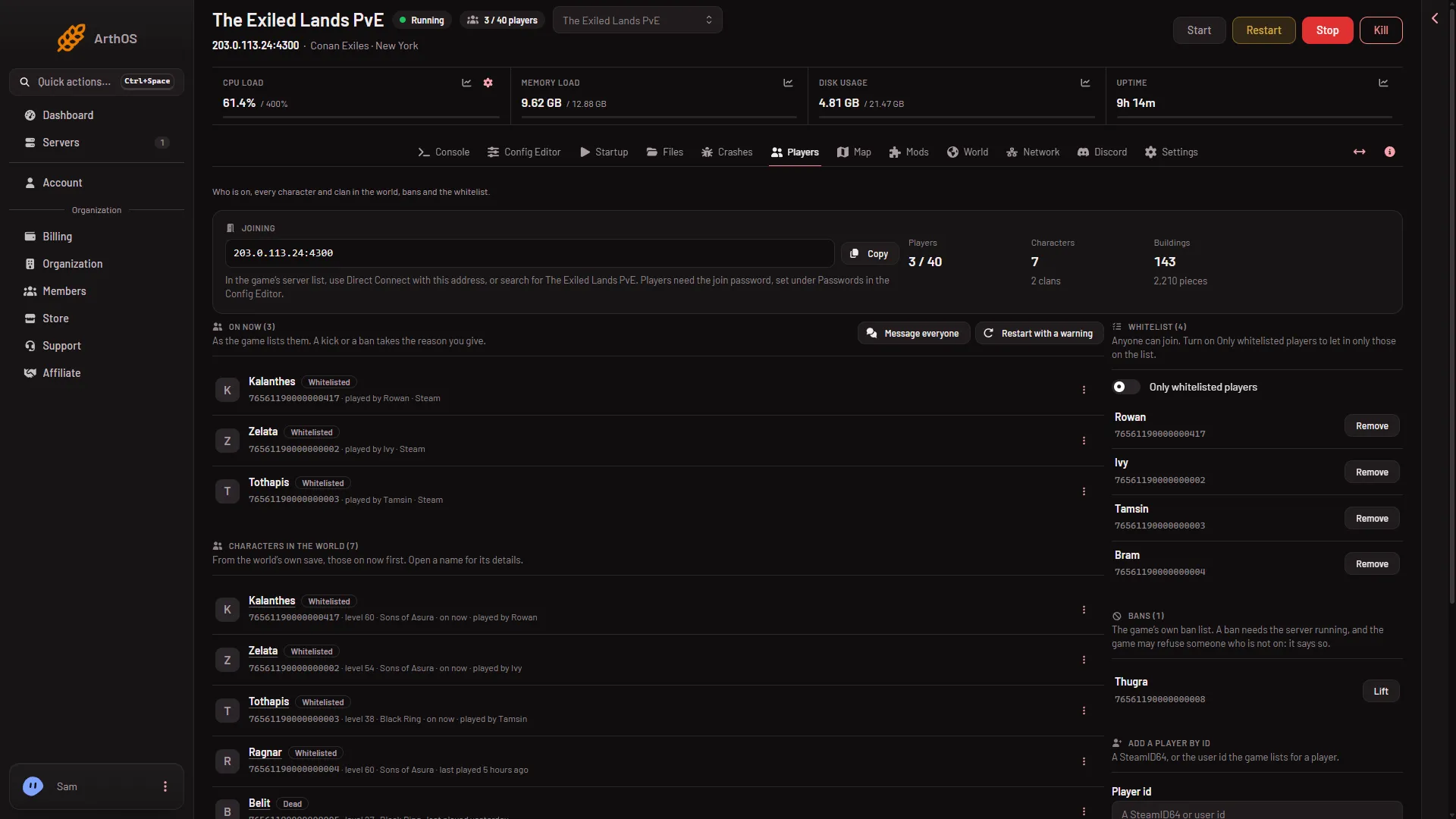
- Copy the address
- How players join
Direct Connect with the address is the way that always works. How to join a Conan Exiles server has the details, including the join password.
Become admin
The Admin password gives you admin rights in the game. It is made for you, so you have to read it first.
- Open the Config Editor and choose the Passwords source.
- Find the row Admin password (1) and read its value, using the eye button. Do not share it.
- In the game, open Settings, then Server Settings, press Make Me Admin, and type the password.
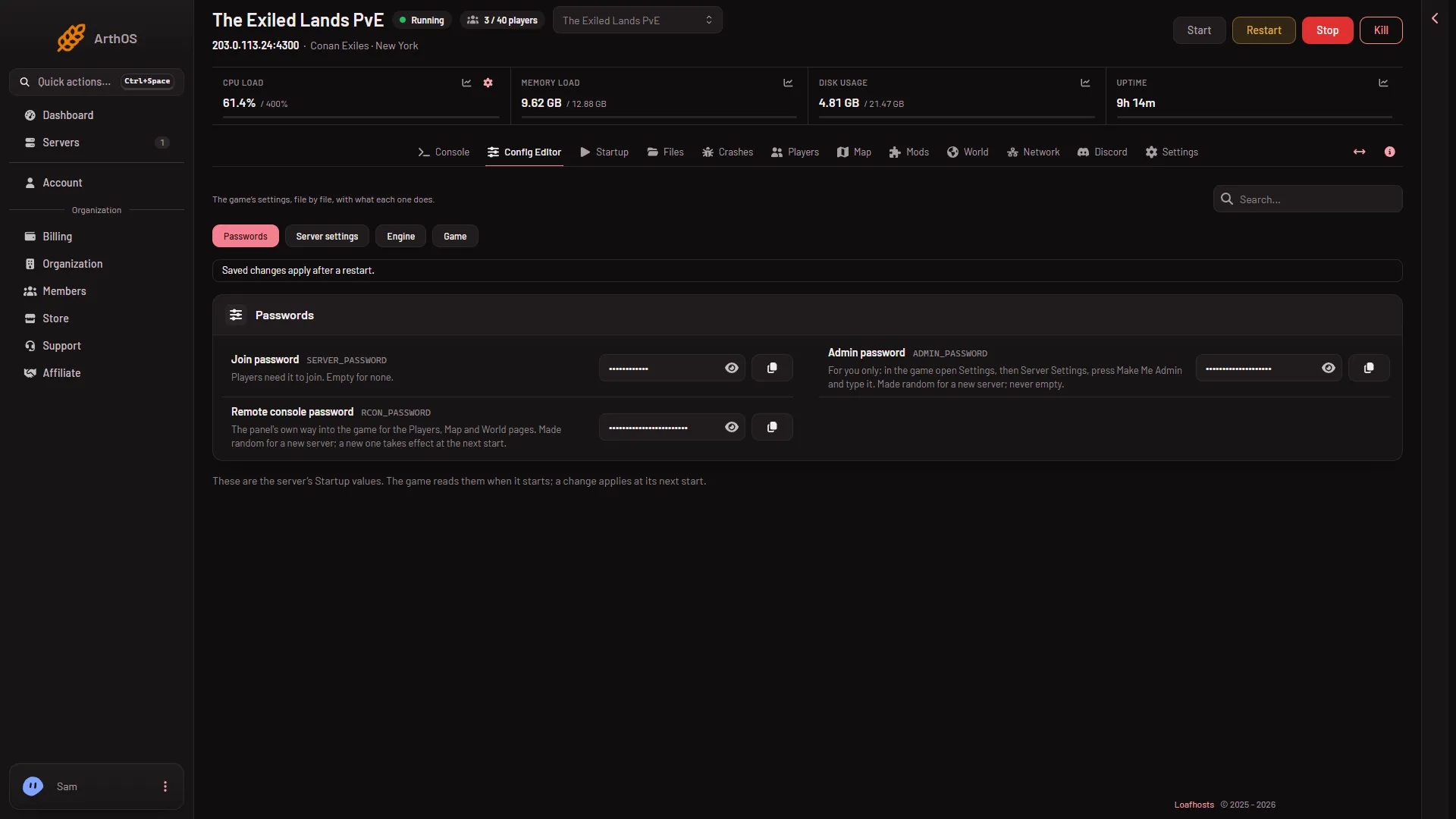
- Admin password
- Join password
The steps are in make yourself admin. All three passwords are explained in Conan Exiles server passwords.
Stopping the server
A stop asks the game to save and exit. On a played world that took about 40 seconds. The first stop of a brand new world took up to 3 minutes and 43 seconds when measured. The Auto-Kill card under Settings shows Seconds until auto-kill: read the number there. It is the time the panel waits before it kills a stop that has not finished. Do not lower it.
If it does not work
- The Players page says the server is not answering. The game is still loading. Wait half a minute after the start and look again.
- You cannot find the server in the list. Use Direct Connect with the address from the Joining card.
- The server stopped by itself while it loaded. It may have run out of memory. The Crashes page says so when it did. Leave the Isle of Siptah out on the World page if nobody plays there, or use a bigger plan.
- Make Me Admin says the password is wrong. Check the Admin password row under Passwords. If you changed it, restart the server first.
- Friends cannot join. Everyone needs Conan Exiles Enhanced. A player who has updated cannot join an older server, so keep Update on start on.
Next
- Add mods: install Workshop mods.
- Move a world you already have: move a server from another host.
- Give a friend a way in: give a friend access.
Sources: exiles-enhanced.inflexion.io: Settings, exiles-enhanced.inflexion.io: Regions, conanexiles.com: Dedicated servers