

















An Enshrouded server has no single password. It has one password for each group: Admin, Friend, Guest and Visitor. The password a player types when they join decides which group they are in. Change a password on the Players page or under Passwords in the Config Editor, then restart the server.
Checked on the 1.0 server (1.0.1.2, build 26430253).
What each password gives
These are the values a new server’s file starts with, set by Keen Games, who make the game:
- Admin: build in bases, open storage, change the world outside bases, kick and ban, place Flame Altars.
- Friend: build in bases, open storage and change the world outside bases. No kick, ban or Flame Altars.
- Guest: play and change the world outside bases, but no building in bases and no storage.
- Visitor: play, but change nothing in the world, bases or storage.
For friends who should build, give them the Friend password and keep Admin to yourself.
You can change what each group may do. See user groups and permissions.
In the ArthOS panel
A new server starts with random passwords for all four groups.
On the Players page
- Open the Players page and find Groups and passwords.
- Each group shows its password. Choose Copy to copy it.
- To change one, choose New password. The panel makes a new random password for that group and saves it at once.
- The group now shows Applies at restart. A restart applies the new password. Restart the server from Console, or use the restart button on the page if it shows one.
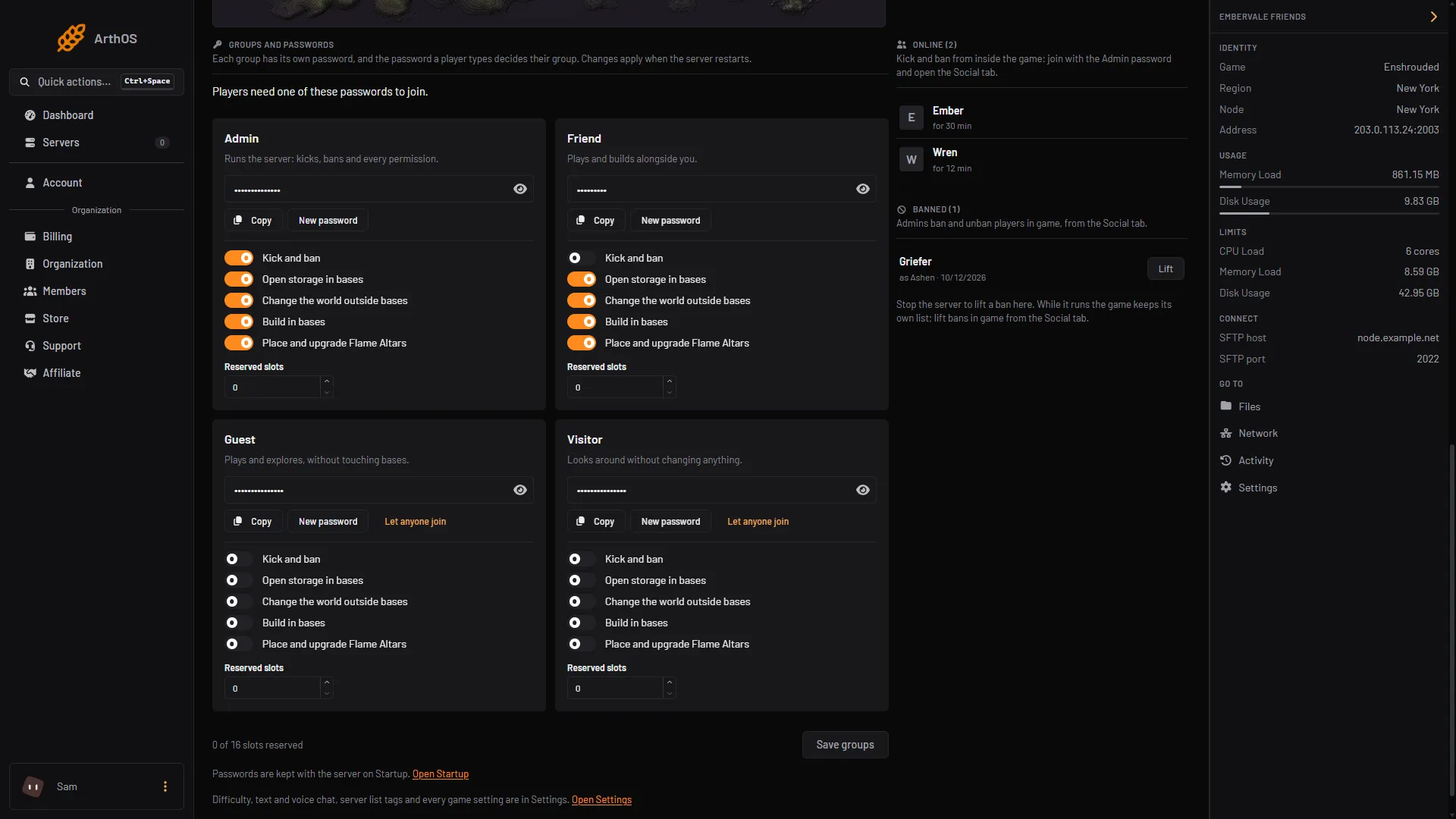
- New password for this group
The picture shows your server’s switches, not the defaults. The password row and New password are the same on every card.
In the Config Editor
Open the Config Editor tab and choose the Passwords button. Type your own into Admin password, Friend password, Guest password or Visitor password. Each box is masked: use the eye button to read it, or Copy. Choose Save in the bar at the bottom, then restart. The Startup page only points you here now.
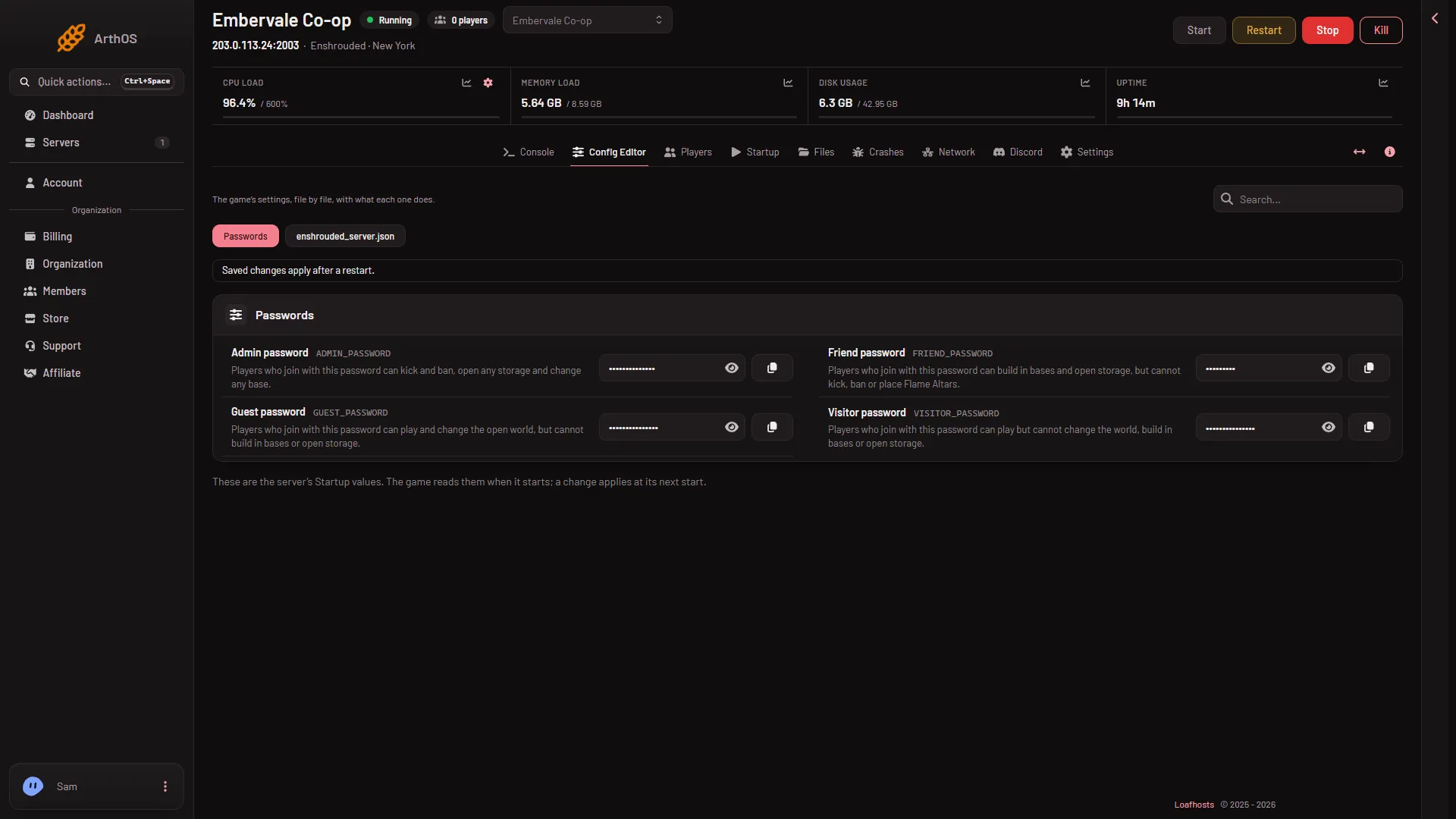
- Admin password
- Friend password
- Guest password
- Visitor password
The four rows are Admin password (1), Friend password (2), Guest password (3) and Visitor password (4).
Let anyone join
A group with no password lets anyone join as that group. On the Players page, Let anyone join does this for Guest and Visitor only. It is not offered for Admin or Friend, so strangers cannot be handed the right to build in bases or open storage. If one of the two is already open to anyone, the button is not shown for the other one. To go back, choose Require a password. For a server that people join to collect materials, see Enshrouded resource servers.
The page shows “Anyone can join without a password, as Visitor.” when one group is open, and “Players need one of these passwords to join.” when none is.
Passwords must be different
If two groups share a password, the page warns you. Players can then only ever join as one of them. Give every group its own.
By hand
Stop the server first, because this is a hand edit. Open enshrouded_server.json, find the group in userGroups and change its password. Start the server. On Loafhosts, the panel writes the four standard passwords from the four Passwords rows at every start, so change them there. The old password line near the top of the file is not used for dedicated servers.
If it does not work
- The new password is refused. The change applies at restart. Restart the server, and check the group shows no Applies at restart.
- Someone joined with more rights than expected. Check that two groups do not share a password and that no group is open.
- Save under Passwords rejects my password. It must not be only digits, and it must be 64 characters or fewer.
- I cannot see the passwords. Your role cannot change the server’s startup settings and files, or cannot open the Config Editor. Ask the server owner.
Sources: enshrouded.zendesk.com: 19191581489309 Server Roles Configuration, enshrouded.zendesk.com: 16055441447709 Dedicated Server Configuration, store.steampowered.com: 1203620