

















A Squad server loads every mod that sits in a folder named after the mod’s Workshop ID, inside SquadGame/Plugins/Mods. On Loafhosts you do not make those folders yourself. The Mods page downloads each mod from the Steam Workshop and puts it there. The Startup page has no mod setting.
A server with mods is listed under Custom in the server browser, not on the main tab. The Mods page says so under the Add form.
What you need
- The mod’s Workshop link or ID. The ID is the number at the end of the mod’s Workshop page address.
- A role that may change the server’s startup settings and restart it.
In the ArthOS panel
- Open your server, then Mods. A server with no mods opens on the Workshop tab.
- In Add by link or ID, paste one or more Workshop links or IDs, or a collection link. Choose Look up.
- Read the Add these mods? list. It shows each mod, its size, and any mod it needs, which is added too. Choose Add.
- You are back on On this server, with the new mods marked New. Nothing has changed on the server yet: the bar at the bottom, Changes not applied yet, waits for you.
- Choose Apply and restart. If the server is stopped, the button reads Apply. Confirm the dialog.
Progress shows at the top of the page, and the Console prints each step. If a download fails, the copy the server had stays and the mod is left on the list, waiting, with the reason shown on the page.
When the server starts, it prints the Squad maps it added, and then the modded maps. Open the Console page to read it, or SquadGame/Saved/Logs/SquadGame.log in Files.
Update or remove a mod
To update a mod, open Mods. A mod with a newer Workshop version has an Update chip. Choose Update on its row, or Update all, then Apply and restart. The panel never updates a mod by itself.
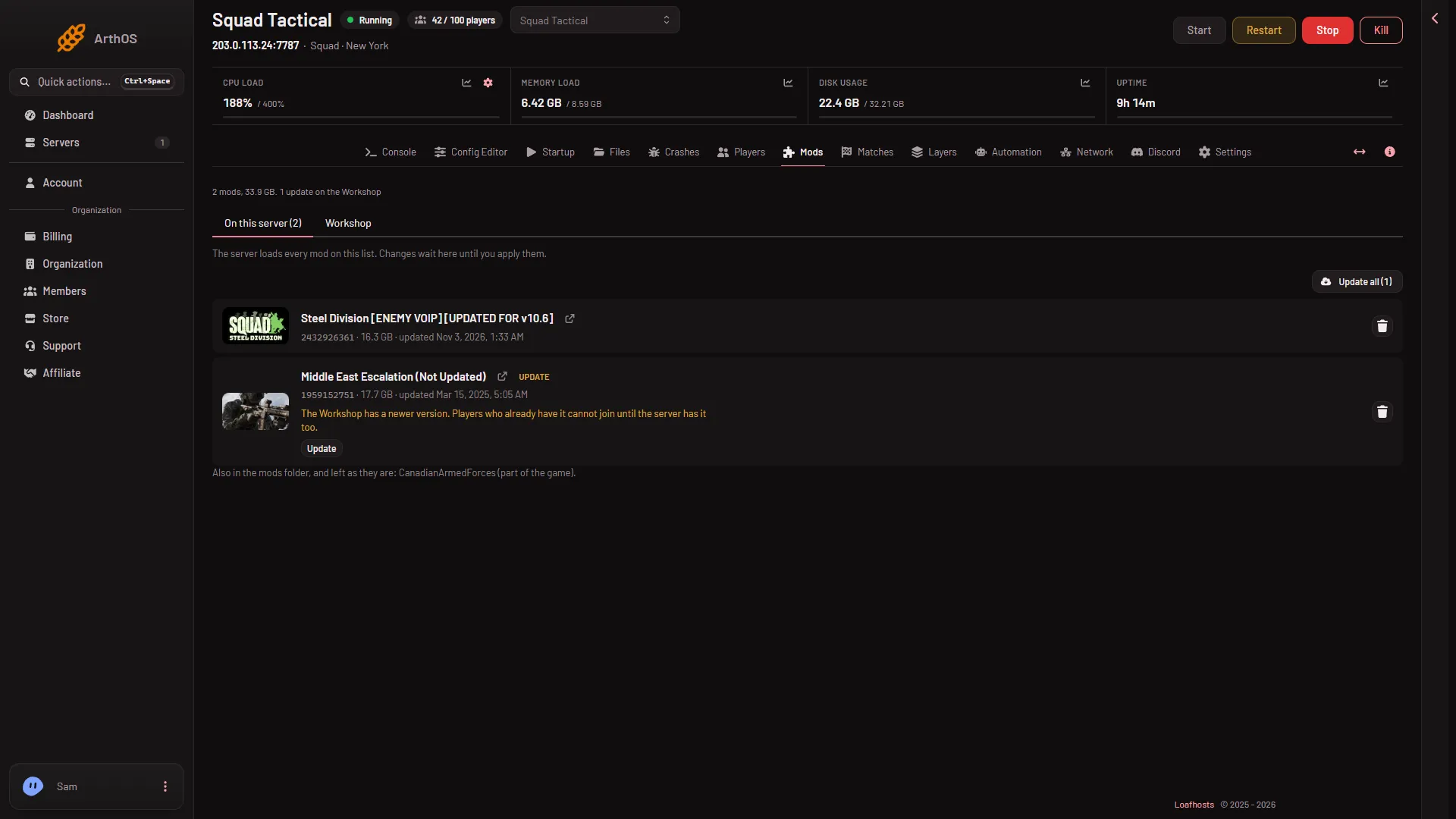
- On this server tab
- Update chip
To remove a mod, choose the red trash button on its row, then Apply and restart. The mod is kept aside, not loaded. It then shows under On the server, not loaded, where Put on the list brings it back without a new download and Delete files frees its space.
By hand
A numbered folder you upload yourself still works. In Files, open SquadGame/Plugins/Mods (make the folders if they are not there) and use Upload Directory to upload the mod’s folder from your PC. Name it only with the mod’s ID. Squad keeps downloaded mods in steamapps\workshop\content\393380 on your PC. The folder then appears on the Mods page as a mod with an unknown version. In Files, a delete goes to the Trash first, where Restore puts it back for 3 days.
Optional: ModsConfig.cfg
The stock file SquadGame/ServerConfig/ModsConfig.cfg controls which mods get their extended features and in what order. Its own header reads: “Server configuration file to control which mods to enable and what order. The mods should be mentioned by their IDs, separated by commas. Mod’s ID could be found in the *.mi file in the mod folder. Mods that are not mentioned here, won’t have their extended features enabled, but still will be loaded and their content will be available.” The line to fill in is ModLoadOrder=. The Mods page does not read or write this file.
No mod has been installed on a Loafhosts Squad server to test this, so what the line changes in practice is Not checked as of 13 October 2026.
What players see
In the Custom server browser, a server with mods has a wrench symbol. Clicking it lists the mods. A player who joins without a mod is told which mods are missing or out of sync and can choose DOWNLOAD ALL.
A mod that adds maps gives you layer names. Take them from the mod’s Workshop page and add them on the Layers page with Add by ID. See the Squad layer list.
If it does not work
- The mod does not load. Open Mods and read the row. A chip such as Not downloaded, Not on the Workshop or Wrong game says why, and the strip above the tabs names any mod that failed to download. Offworld’s advice for a mod that will not load is to remove it and download it again.
- The server stops starting after you add a mod. Take the new mod off the list with the trash button and choose Apply and restart. If it starts, the mod is the cause. The mod may not be built for the current game version. See Squad crashes after an update.
- Apply says there is not enough disk. The panel checks the download size first. Free some space with Delete files under On the server, not loaded, or raise the disk.
- Nobody can find the server. Mods or no licence put a server on the Custom tab. See Squad server not in the list.
Offworld’s rules say a Workshop mod must work on both Linux and Windows without extra tools. If a mod does not run on the server, ask its author.
More about the game: Squad servers.
Sources: squad.fandom.com: Uploading a mod to a dedicated server, squad.fandom.com: Playing a Mod, squad.fandom.com: Server browser, squad.fandom.com: Unable to load a Layer, joinsquad.com: Server licensing and administration policies