

















To teleport a player, run tp <player> <other player> or tp <player> <x> <y> <z>. In the ArthOS panel, open the player in the Players tab, then the In the game tab, and use the Teleport boxes. The player must be in the game.
In the ArthOS panel
- Open your server and choose the Players tab.
- Click the player’s name. Their own page opens.
- Choose the In the game tab (1). The Teleport card (2) is at the top right. For a player who is offline, the tab only says “Game mode, teleporting and messages need the player in the game.” The Teleport boxes work while the player is online.
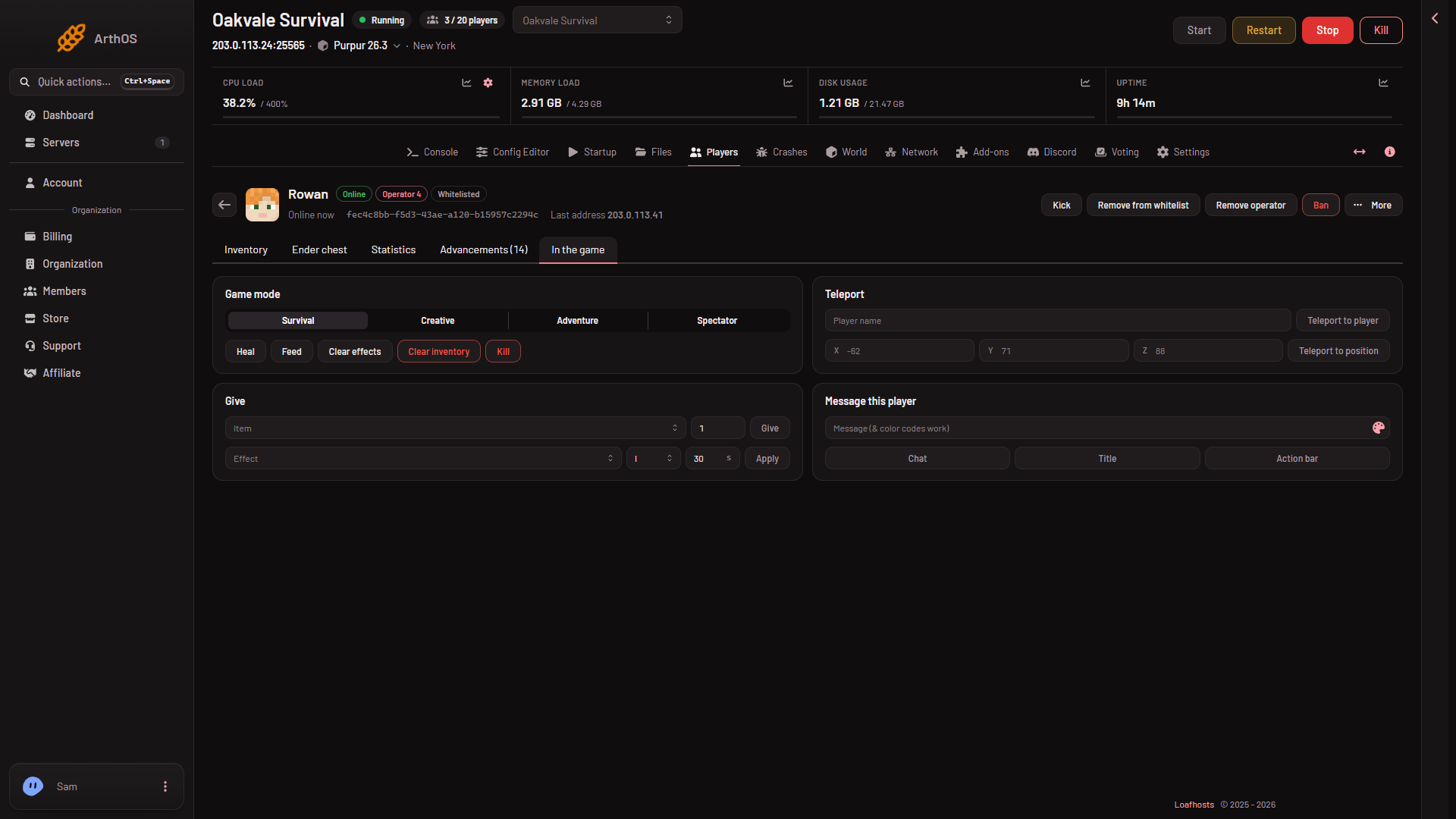 4. To send them to another player, type that player’s name in the Player name box under Teleport. The box suggests the other players who are online. Choose Teleport to player.
5. To send them to a place, type the three numbers into the X, Y and Z boxes. The grey numbers in the boxes are the player’s position now. Choose Teleport to position.
6. The panel answers “Teleported.” The player moves at once.
The coordinates box moves the player inside the dimension they are in now. To send someone to a player in another dimension, use Teleport to player. The game lets a player teleport to a player in another dimension.
If the In the game tab is missing for a player who is online, your role may not allow it. Ask the server owner.
The commands
The command forms come from the Minecraft Wiki’s teleport page. You can also type these in the Console. Type them with no slash. The Console is not a player, so always say who moves.
| What you want | Command |
|---|---|
| Send Alex to Steve | tp Alex Steve |
| Send Alex to a place | tp Alex 100 70 -200 |
| Send Alex to a place in the Nether | execute as Alex in minecraft:the_nether run teleport 0 70 0 |
tp is short for teleport. Both do the same. The last row follows the Minecraft Wiki’s example for another dimension. The dimension names are minecraft:overworld, minecraft:the_nether and minecraft:the_end.
Both players must be online. You can name a player by their name or by their UUID (see find a player’s UUID).
By hand
In game chat, an operator types the command with a slash. Teleporting needs operator level 2 or higher, so see make a player an operator.
/tp Stevesends you to Steve./tp 100 ~3 100sends you to x 100 and z 100, three blocks above where you are now. A~means “from where I am”./tp @a @ssends everyone to you.
Coordinates have limits. The x and z numbers must be between -30,000,000 and 30,000,000. The y number must be between -20,000,000 and 20,000,000. A bigger number fails.
More commands are in Minecraft server commands, and more about the game is on the Minecraft page.
If it does not work
- Nothing happens. The name must be exactly right and the player must be online. The game does nothing for a name it cannot find.
- There is no Teleport box. The player is offline. The panel cannot teleport a player who is not in the game. Teleport them after they join.
- The Player name box lists nobody. It lists the other players who are online. It does not list the player you are moving.
- A big number is refused. Keep the coordinates inside the limits above.
Sources: minecraft.wiki: Teleport