

















Standby stops a Project Zomboid server that nobody has played on for a while, so the machine’s memory goes to servers people use. By default the wait is 10 days. Standby is on for new servers unless the owner turned it off. It is a normal stop that saves the world. Nothing is deleted. Start the server again with Start, or with its wake link.
Standby is not the game’s own pause. The game setting Pause time when nobody is on stops the world clock while the server keeps running: see pause a Project Zomboid server when nobody is online. Standby stops the whole server.
How to tell it was standby
Open the server. The server header shows Standby. If your role may change standby, a box This server is in standby also opens. It says when the server went into standby and that nothing was deleted.
Standby is not a crash. A crash shows on the Crashes tab: see Project Zomboid server crash.
Change the wait, or turn it off
- Open Settings, then the Settings tab.
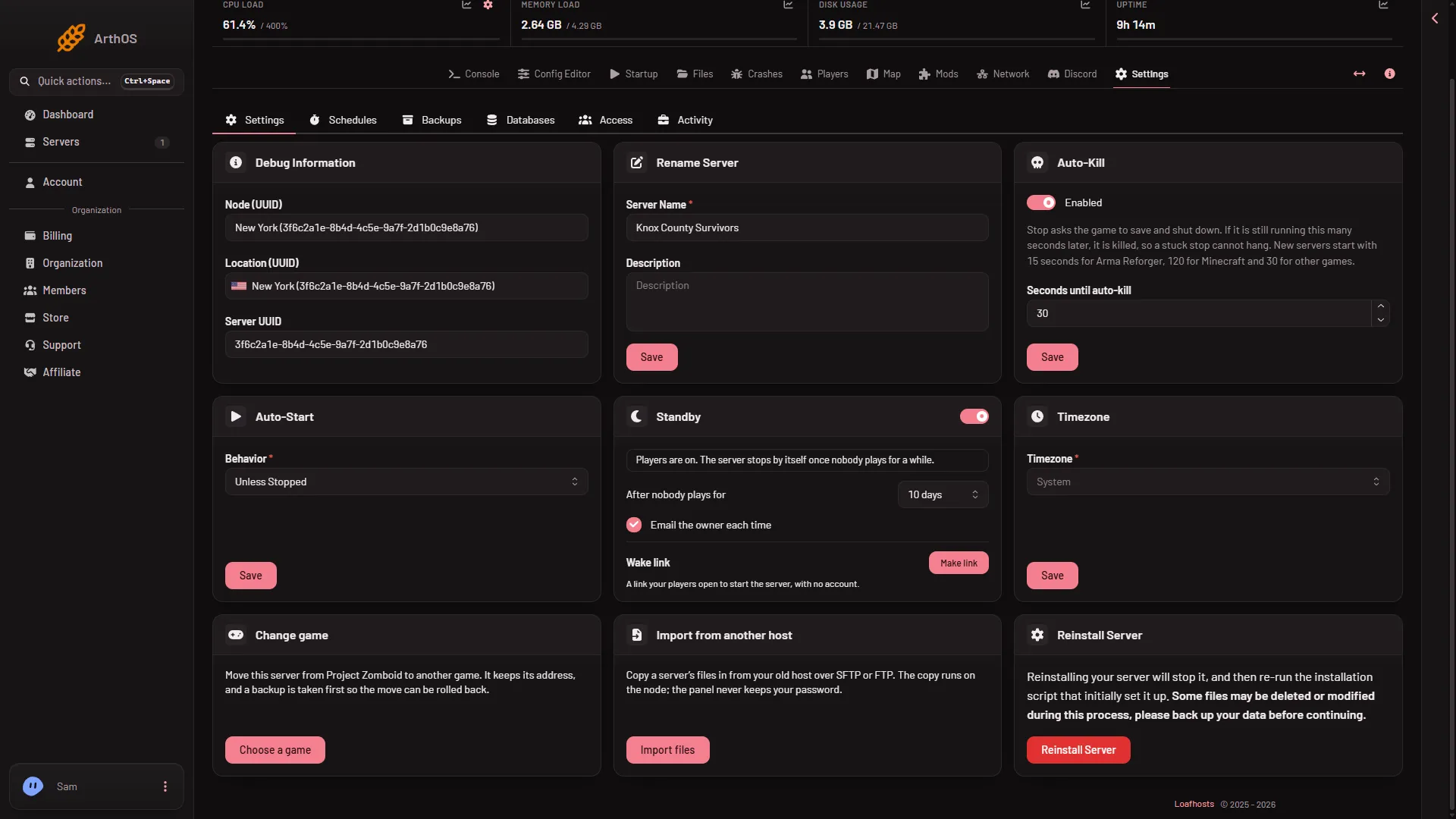
- Find the card Standby.
- Use the switch in the card header to turn it on or off. Its name is Stop the server when nobody plays on it.
- Choose a time in After nobody plays for: 30 minutes, 1 hour, 3 hours, 12 hours, 1 day, 2 days, 3 days, 7 days, 10 days, 14 days or 24 days.
- Tick Email the owner each time if you want an email whenever it goes into standby.
- Standby card
- Switch
- After nobody plays for
- Email the owner each time
- Wake link
The card (1) holds the switch (2), the wait (3), the email box (4) and the Wake link (5). There is no Save button. A change is saved as you make it, and the page says “Standby settings saved.”
If you pick a time shorter than the time nobody has been on, a box asks Go into standby now? Press Save and the server goes into standby within a few minutes.
To see the card your role needs permission to read standby. To change it you need the standby and stop permissions.
Start it again
- Press Start at the top of the server page.
- Or open the wake link. It starts the server and does nothing else.
The wake link
On the card, under Wake link, press Make link, then Copy link, and send it to your players. Anyone with the link can start the server. They cannot stop it, change settings or open files. It can start the server 12 times a day. Making a link needs the standby link and start permissions.
Under Options you can show the join address on the wake page, and add a Start server button to Discord status messages. New link makes the old link stop working at once. Turn off removes it.
How the panel decides nobody plays
- Only a player count that the game itself answered counts. A server whose count cannot be read is never stopped.
- A second count must agree before a stop. If it cannot be read, the stop waits one more hour.
- It does not stop while a change, backup or wipe is running.
- A start that nobody joins within 60 minutes goes back to standby. A start you made by hand gets the whole wait again.
- While the server is in standby, schedules wait instead of waking it.
If it does not work
- The server stopped and the Standby switch is off. Standby did not do it. Open the Crashes tab, then Settings, then Activity: see Project Zomboid server crash.
- The card says the server did not stop within 10 minutes. It was left running and standby tries again later.
- The card says “Waiting: the panel cannot read how many players are on”. The panel never stops a server whose players it cannot count.
- Time passes in the game while nobody is on. That is the game’s own setting, not standby. See the pause guide above.
- Players cannot start it. Make a wake link and send it. Without link permission the card says “Making a wake link needs the standby link and start permissions.”