

















A wipe goes wrong when the panel could not finish it, or when a file was left behind or a setting was not changed. Start with the Wipes tab: it says what happened. Wipe failed and the server is down? Open Wipes, then History. If the banner has Roll back, that puts the old map back. The steps are in Wipe your Rust server, and Rust forced wipe day covers the monthly update.
Read what the panel says
Open the Wipes tab.
- A red line in the band, “The last wipe, (when), stopped: (reason)”, gives the reason of the last failed wipe.
- History (1) lists the last 20 wipes with a status: Waiting, Running, Done, Failed or Skipped. Each wipe (2) is one row. Open What happened on a row to see every step and its time.
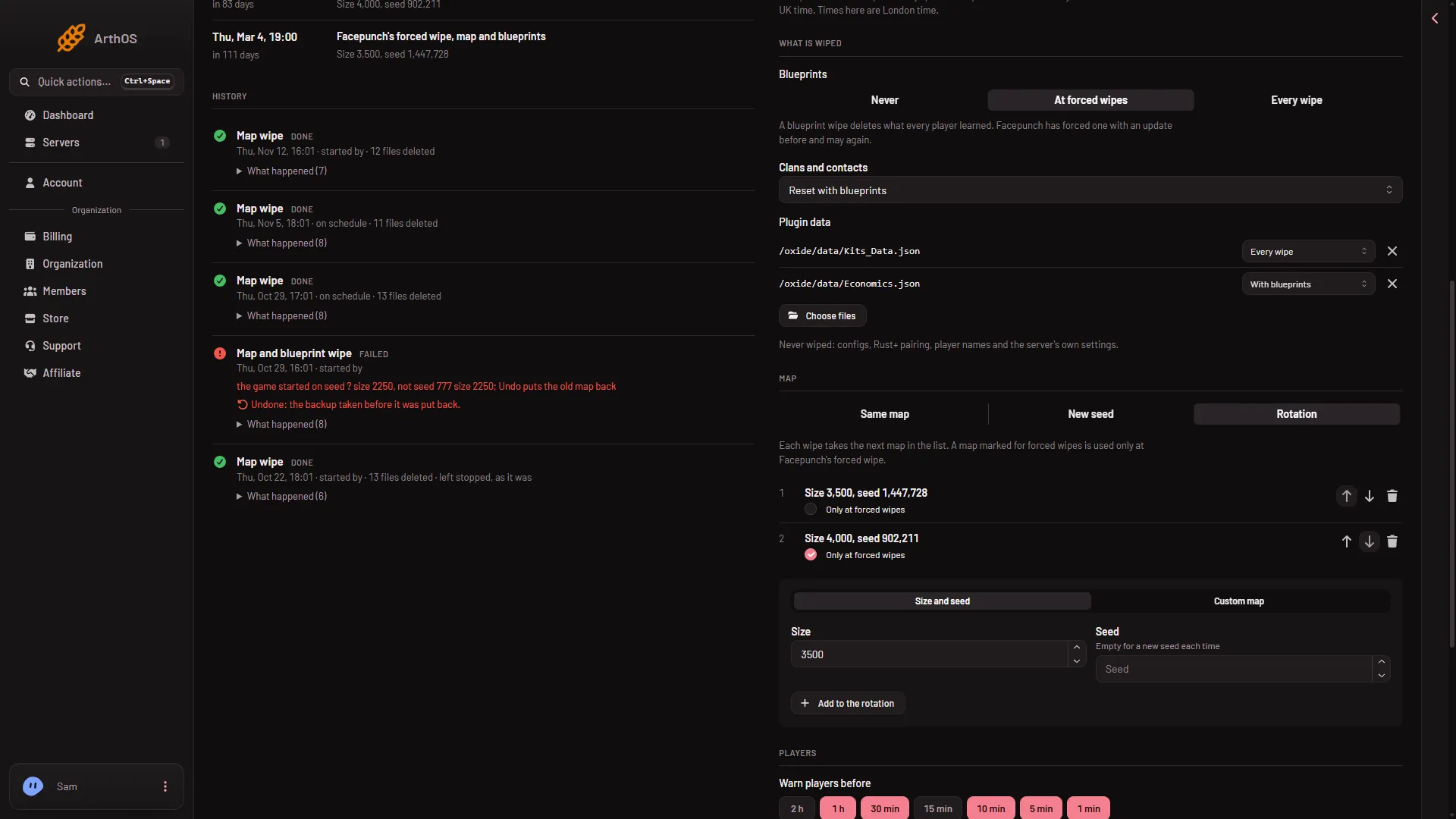
- History
- A wipe
- Coming up shows planned wipes that will be skipped, greyed, with the reason.
- While a wipe runs, a banner at the top shows its stage. When it ends it says Wiped the map, or Could not wipe the map with the reason.
Reasons you may see:
- Missed: the panel was not running at the wipe time. A wipe more than 2 hours late is not run.
- The wipe plan was turned off while it waited, or the server is suspended.
- Another change kept the server busy for two hours. Only one change runs on a server at a time. Wait for the other change to end, then use Wipe now.
- Files could not be deleted. The panel lists them. Every other file on the list was already deleted and the server is stopped, so check the server’s state in the header. If a backup was taken, Roll back puts everything back. Otherwise use Wipe now again.
- The server stopped while starting on its new map, did not answer within 45 minutes, made no new map file, or started on a different seed or size. The console says why.
- Skipped: Facepunch’s forced wipe is the wipe this day. A wipe within 12 hours of the forced wipe is replaced by it. This is not a fault.
- Replaced by a wipe started by hand. You used Wipe now while a wipe waited for Facepunch’s update.
If the wipe took a backup, choose Roll back in the banner. It stops the server and puts the backup back, and the history row then says that it was undone. Without a backup the banner says it cannot be rolled back. Roll back needs the rights to change startup settings and restore backups. A wipe’s backup also shows under Settings, then Backups. The backup is made only when Take a backup before each wipe (1) is on, under Safety, or when you ticked Take a backup first in Wipe now. The full list of reasons is in read your Rust wipe history and fix a failed wipe.
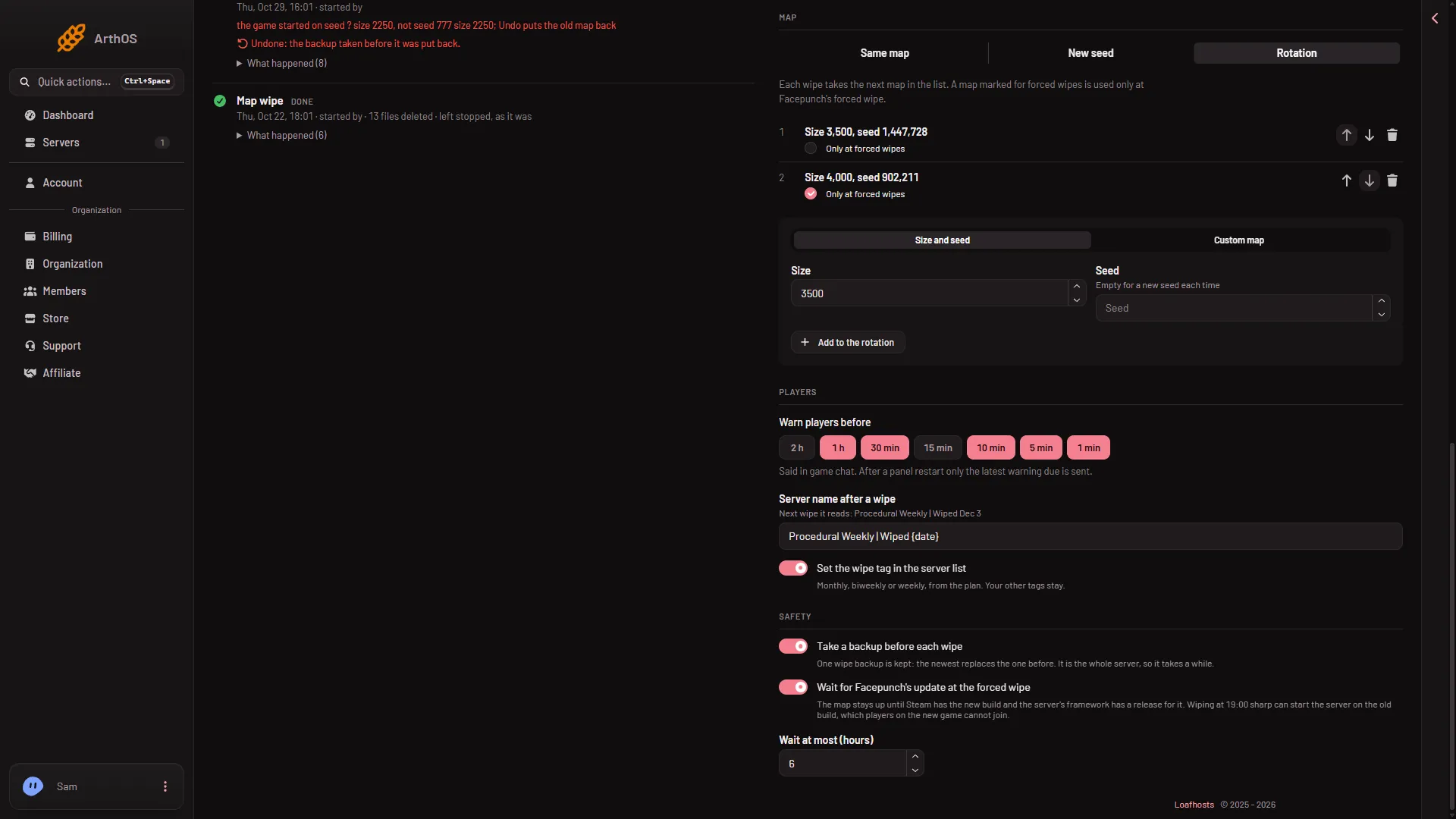
- Take a backup before each wipe
Check the files first
If the panel says Done but the world is wrong, or you wiped by hand, stop the server, then open Files and go to server/rust. Look at the save files. On the October 2026 update the folder held these:
proceduralmap.<size>.<seed>.<protocol>.sav, and the copies.sav.1and.sav.2(1 in the picture). The save holds the map’s entities, buildings and deployables.player.blueprints.<number>.dband its-walfile (2 in the picture). Blueprints live here.
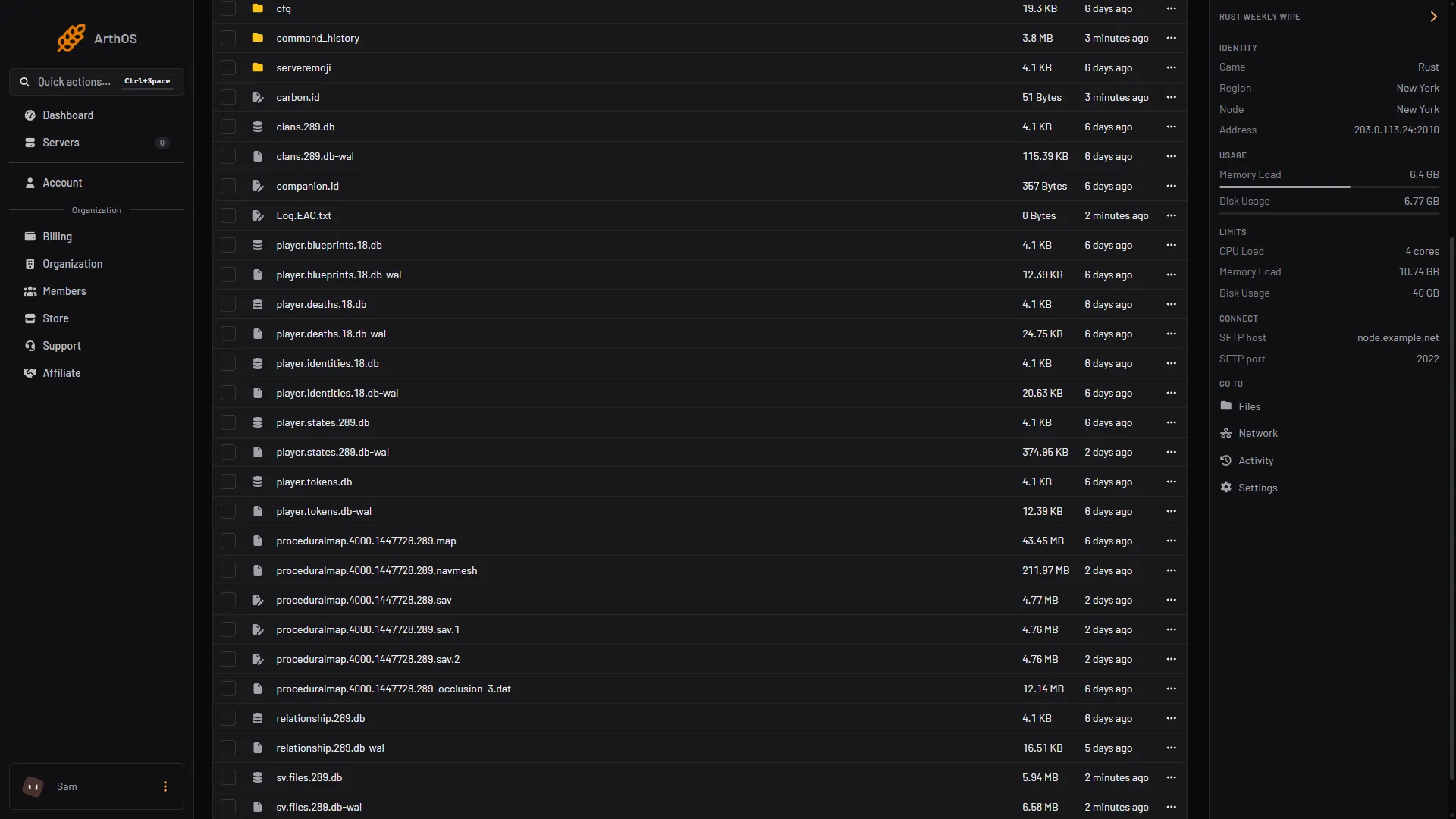
- Save file and its copies
- Blueprint files
The old map still loads
Look for one of these causes, in this order.
- The wipe is set to the same map. Under Map on the Wipes tab, Same map makes the same size and seed fresh, with the same layout. Choose New seed or Rotation for a new layout.
- A save copy was left behind (by hand). The game keeps older saves as
.sav.1and.sav.2. If you delete only the.sav, the game can load an old copy. Delete the.savand every.sav.<number>together. The number of copies is the Config Editor row World backups kept (server.savebackupcount, game default 2). - The seed and size are the same. After you delete the save you get the same layout with fresh loot and no buildings. For a new layout, change Map seed on the Startup tab and choose Save.
- A custom map is set. If Custom map URL on the Startup tab holds a link, the server loads that file. A new seed changes nothing on a custom map. Clear the field for a generated map. See Rust custom map will not load.
- Players see an old custom map. Facepunch, the maker of Rust, says a player with an older
.mapof the same name loads that one. Give the changed map a new unique name.
Then start the server. A new map takes a few minutes to generate. The Console says Server startup complete when it is ready.
Blueprints are still there
A map wipe keeps blueprints unless the plan wipes them. Under What is wiped on the Wipes tab, set Blueprints to Every wipe, or to At forced wipes for the monthly one. For one wipe, choose Map and blueprints in Wipe now. The panel never wipes blueprints alone.
By hand, Facepunch’s wiki says that to force a blueprint wipe you must delete the blueprints file at the same time.
- Stop the server.
- In
server/rust, delete theplayer.blueprintsfile and its-walfile. - Start the server.
Do not compare the numbers. For example, in the picture the blueprint file ends in 18 while the map files end in 289. Look for the file name that starts with player.blueprints.
The update of 5 November 2026 reworked blueprints. Its post does not announce a blueprint wipe. Facepunch sometimes wipes blueprints in a monthly update, and says so in its news post. Read the post before wipe day.
Plugin data was not reset
A plugin keeps its own data apart from the game’s save. Oxide plugins keep it in oxide/data and Carbon plugins in carbon/data. The panel does not know which files a plugin needs wiped. The plugin’s page on uMod says. See blueprints and plugin data in a wipe. Once you know the files, choose them under Plugin data on the Wipes tab with Choose files, so each wipe resets them. Set each to Every wipe or With blueprints. The History row says how many of the chosen files were reset.
- Kits. The Rust Kits page lists the option “Wipe player data when the server is wiped”. It is off by default, so run
/kit resetafter a wipe if you want everyone to start again. See add kits to your Rust server. - Backpacks. Backpacks keep their items across a wipe unless
Clear on wipeis turned on. See the Backpacks guide, section “What happens on a wipe”. - Clans. The game’s own
clans.<protocol>.dbfile is wiped when Clans and contacts is set to reset. A clan plugin keeps a separate list in its own data file,clan_datainoxide/dataorcarbon/data. Stop the server first. Not checked as of 11 October 2026: deleting that file.
Do not choose a plugin’s whole data folder without reading its page. Some plugins keep settings in that folder.
The server will not start after a forced wipe
With a plan on, the panel waits for the update before wiping, so the server does not start on an old build. It then checks that a new map was made. These are the other causes.
- The map is still being made. The first start after a wipe generates a new map and a large one takes minutes. Wait for
Server startup complete. - A custom map link is set. Clear Custom map URL on the Startup tab, or check that the link still downloads. The rotation checks each custom map’s address before the wipe and passes over a dead one.
- Not enough memory. A bigger map needs more memory. See fix a Rust server running out of memory.
- An old save was renamed to avoid the wipe. Facepunch’s wiki calls this dangerous and not recommended. Delete it instead, or restore a backup made on the matching game version.
- Plugins fail. A plugin that does not compile leaves the server running, and its row says Failed to load; the Console holds the reason. See Rust plugins not loading after an update.
Read the Console from the start of the server for the first error line.
By hand
Take a backup first. Stop the server. The full file list is in the wipe guide. In server/rust, or the folder named after the server identity you set, delete the .sav and every .sav.<number> for a map wipe, and the player.blueprints files and their -wal files for a blueprint wipe. Set a new seed in Map seed on Startup. A seed in server.cfg does nothing, because Startup writes the seed at every start. Then start the server.
In Files a delete goes to the Trash first, where Restore puts it back for 3 days. Files in the Trash still count toward your disk until you choose Delete Permanently or Empty Trash.
If it does not work
- The same map comes back. Check Map seed and Map size on the Startup tab, and that no
.savfile is left inserver/rust. - A file comes back after you delete it. Stop the server first and wait until it shows as offline.
- You want the old world back. Choose Roll back on the wipe’s banner if it took a backup. Otherwise restore a backup from Settings, then Backups. Use a backup made on the matching game version.
More about the game: Rust servers.
Sources: wiki.facepunch.com: Getting Started w Server, wiki.facepunch.com: Creating a server, wiki.facepunch.com: FAQ and Troubleshooting, rust.facepunch.com: News, umod.org: Rust kits