

















VPPAdminTools is a DayZ admin menu you open in game. Add it with Community Framework, make yourself a super admin by putting your Steam64 ID in SuperAdmins.txt, set its password in credentials.txt, and restart. Its Workshop ID is 1828439124.
What you need
The Workshop page lists one required mod: CF (Community Framework, 1559212036). See the CF guide. The page’s authors are GravityWolf and DaOne, and it was last updated on 15 July 2026. The page says repacking is not allowed, so take the mod only from the Workshop.
VPPAdminTools is a client mod too. Every player who joins needs it, at the same version, while Verify Signatures is on.
You need your own Steam64 ID. It is a 17-digit number such as 76561198420222029. The mod’s guide says to use the real Steam64 ID of the profile you play with, and not numbers copied from a custom profile URL. A site like steamid.io shows it.
In the ArthOS panel
- Open Mods and choose the Workshop tab. In Add by link or ID, paste
1828439124and press Look up. CF comes in by itself as a requirement. Press Add. The list is the load order, with CF first; see mod load order. - Choose Apply and restart. The panel downloads both mods and copies their keys into
keys. For the full walk-through, see install DayZ Workshop mods. - Wait for the server to finish starting.
- Open Files, then
profiles. AVPPAdminToolsfolder appears after the first start with the mod. All of its settings are in there. - Open
profiles/VPPAdminTools/Permissions/SuperAdmins/SuperAdmins.txt. Add your Steam64 ID. If you add more than one, put each on its own line with no spaces at the start or end. Super admins have the highest permissions, and only they can add other users to user groups. - Open
profiles/VPPAdminTools/Permissions/credentials.txt. Follow the instructions written in the file to create your password. If you lose it, create a new one the same way. - Choose Restart again. The password only applies after a restart.
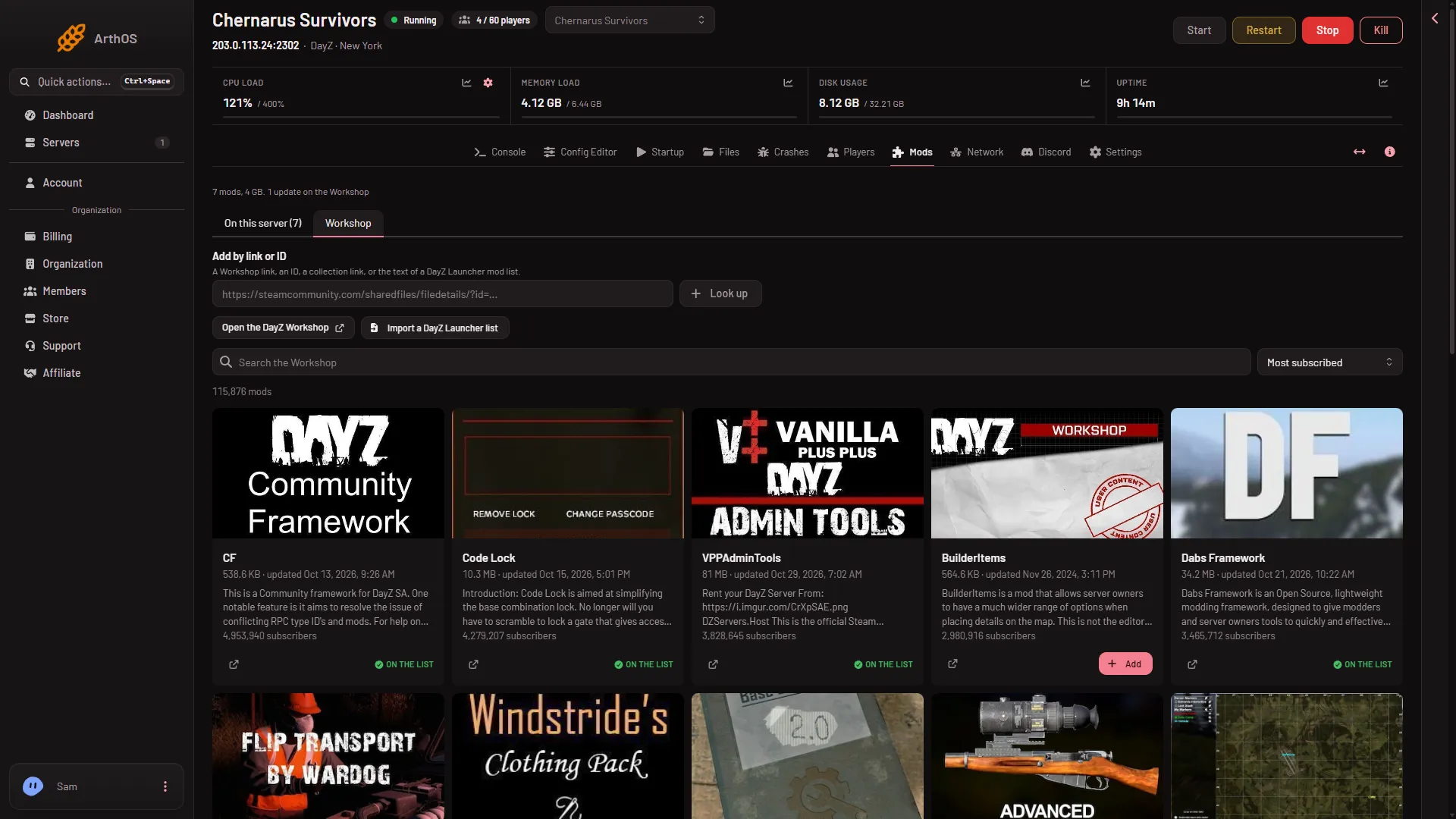
- Paste 1828439124 here
- Look up
Do not confuse this password with Admin Password under Passwords on the Config Editor page. That one is the server’s own admin password. VPPAdminTools has its own.
Open it in game
- Join the server with CF and VPPAdminTools enabled in your launcher.
- In the game, open the settings menu and the keybinds tab. The mod’s keys are listed under VPPAdminTools. The Workshop page says all keybinds are there, and it names no default key.
- Press the key you set for the menu. Enter your password when it asks.
- To give someone else access, a super admin adds them to a user group inside the tool. The tool’s own guide says groups and their members are set up in the game.
By hand
- Copy
@CFand@VPPAdminToolsto the server’s main folder. Copy the files in each mod’sKeysfolder into the server’skeysfolder. - Add
"-mod=@CF;@VPPAdminTools" -profiles=NameOfFolderto the startup parameters. Do not put a;after the last mod, and keep the quotes. - Start the server.
VPPAdminToolsappears inside the profiles folder. - Do the Steam64 ID and password steps above.
If it does not work
- No
VPPAdminToolsfolder. Check the mod is in the-mod=list and spelled correctly, and that you are looking in the profiles folder the server uses. In the panel it isprofiles. - Nothing happens in game. Check the Steam64 ID in
SuperAdmins.txtis the right one for the account you play on. - The password is refused. Create a new one from the instructions in
credentials.txtand restart. Or turn the extra layer off withvppDisablePassword = 1;. - The server does not start with a script or virtual machine error. The mod’s guide says to update the mods you installed, check that their dependencies are installed, and use the latest DayZ patch.
- Players are kicked after the mod updates. See fix the mod mismatch kick.
More about the game: DayZ servers.
Sources: steamcommunity.com: Filedetails, github.com: VPP Admin Tools, github.com: Installation & Configuration