

















Add the mods on the Mods page, then choose Apply and restart. The panel downloads every mod, copies its keys, writes the start line and starts the server again. You do not need a Steam login. Players get the same mods through the DayZ Launcher. See the DayZ game page for what a server includes. Hosting it yourself? See By hand below.
Every mod on the Steam Workshop has a number, its Workshop ID. It is the number after id= in the mod’s web address. For example, https://steamcommunity.com/sharedfiles/filedetails/?id=1559212036 is mod 1559212036.
In the ArthOS panel
Open Mods in the server’s tabs. On a server with no mods it opens on the Workshop tab. Seeing the page needs permission to read the startup settings. Adding a mod to the list needs permission to change the startup settings. Applying needs that permission and permission to restart the server. A member without the restart permission sees the Add form but no Apply buttons.
Add the mods
Use any of these. You can add more than one way before you apply.
- A link or an ID. In Add by link or ID, paste a Workshop link, a mod ID or a collection link, then choose Look up. Several links or IDs at once work too.
- A DayZ Launcher list. Choose Import a DayZ Launcher list and pick the HTML file you exported from the DayZ Launcher. It must be a list that holds the mods’ Workshop links. Its mods are added at the end of the list, in the order of the file.
- Search the Workshop. If a search box shows on the tab, search there and choose Add on a mod.
- A mod only the server needs. On its row, switch Players too to Server only. See server-side mods.
A server loads at most 120 mods. A save over 120 fails with “a DayZ server can load at most 120 mods”.
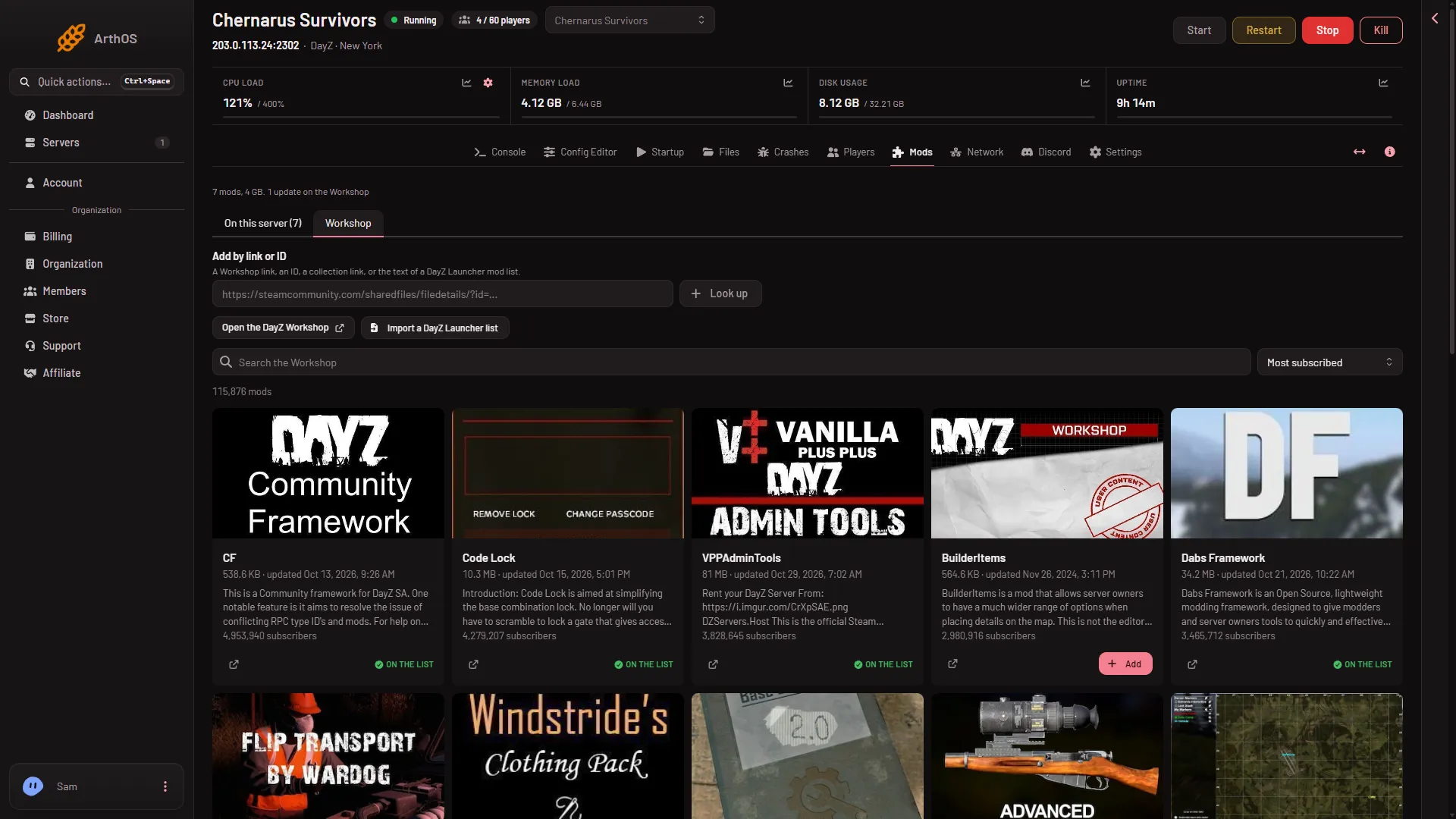
- Add by link or ID
- Look up
- Import a DayZ Launcher list
Look up opens Add these mods?. It lists each mod with its size, and it also lists the mods they need. Choose Add. Nothing changes on the server yet. The mods appear on the On this server tab marked New, and a bar at the bottom says Changes not applied yet. This list is a draft kept for the whole server, so everyone with access sees the same one. If someone else changes it, the page can say the mod list changed since this page loaded.
Apply
- On On this server, check the order and fix any line that says a mod needs another one. Use Add beside that line to bring the needed mod in. See mod load order.
- Choose Apply and restart in the bar. If the server is stopped, the button says Apply and the server stays stopped.
- Read the confirmation, Apply the mod changes?, and choose Apply and restart again. It lists the downloads (2). The server stops, downloads, and starts again. Players online are disconnected.
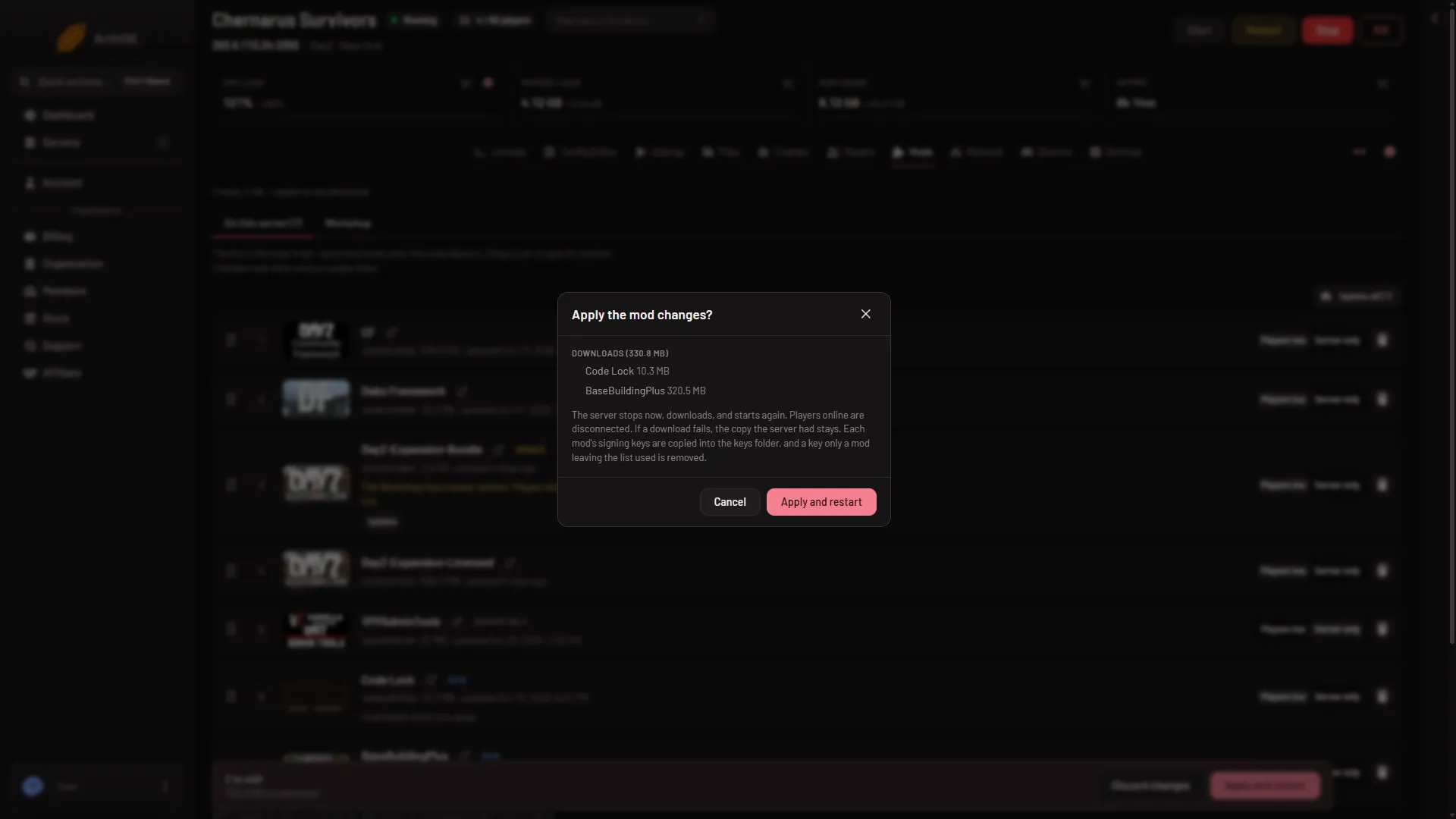
- Apply the mod changes?
- Downloads
- Progress shows at the top of the page. The console prints lines that start with
[mods], for exampleDownloading 3 mod(s) from the WorkshopandDownloaded 1559212036. The first apply with several large mods can take a long time.
The mods are saved in your server’s top folder as @<ID>, for example @1559212036. The panel also copies each mod’s .bikey file into the keys folder (box 1 in the picture below), for example jacob_mango_v3.bikey for Community Framework. See mod keys and signatures. The server in the picture below has no mods yet, so you see only the keys folder.
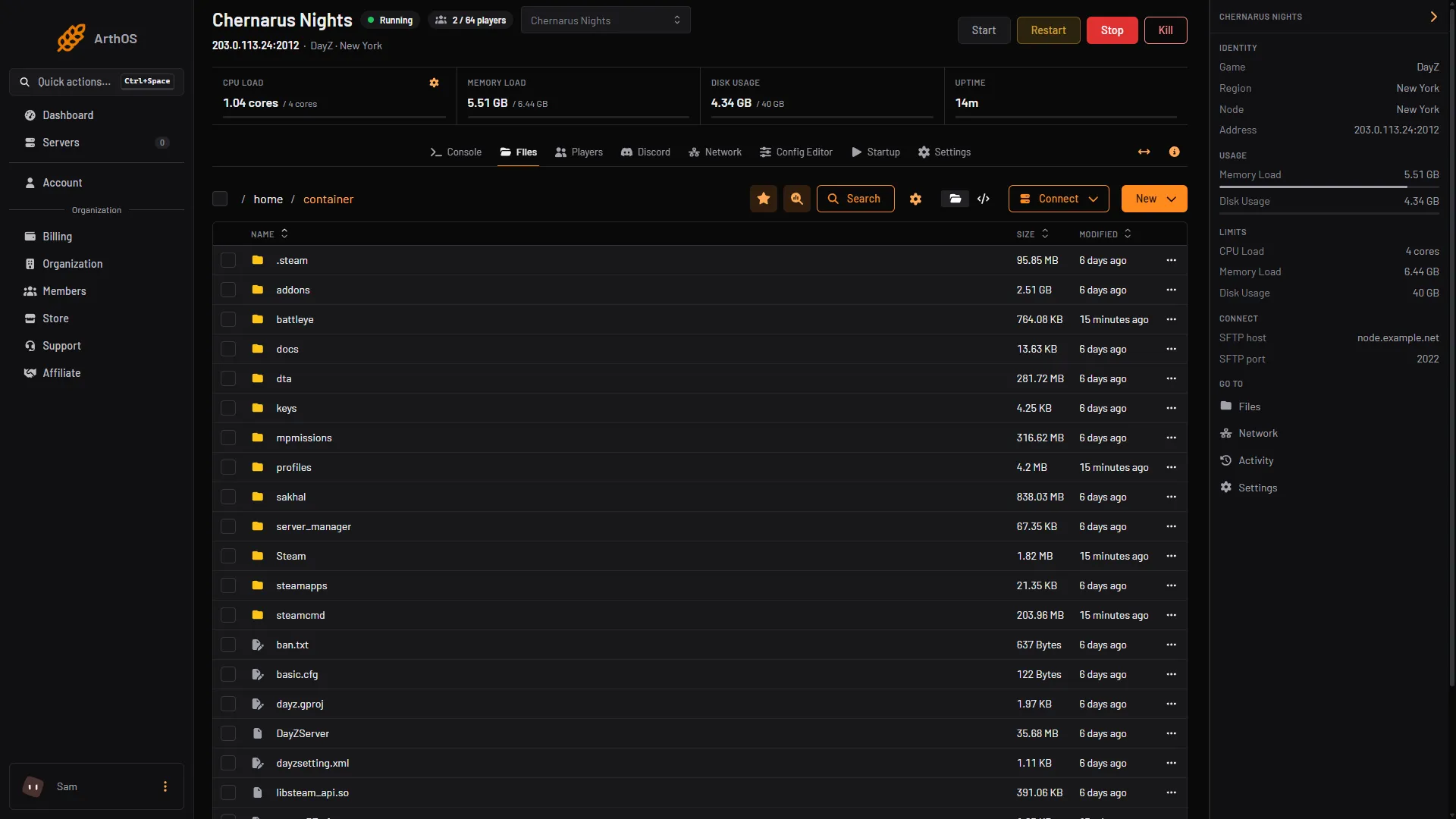
- keys folder
On Startup, Modlist File (Exported from DayZ Launcher) and Additional Mods are read only now. The Mods page keeps them filled for you, so do not type mods there.
At the start, the game writes the exact command it was run with on the first line of its .RPT file in the profiles folder. Look for the part after -mod=. It shows which mods are loaded.
Players
Players need the same mods, at the same version, as the server. They get them in the DayZ Launcher, which installs them from the Workshop. Each mod’s row on the Mods page has an arrow that opens it on the Workshop, which you can hand to players.
A player who is missing a mod, or has an older one, cannot join. See mismatched mods kick.
Mods you upload yourself
A mod that is not on the Workshop can be loaded too.
- Upload its folder to your server’s top folder with Files. Name it
@plus a name made only of letters, digits,_,-and., for example@mymod. - Open Mods. Under On the server, not loaded, choose Put on the list beside it.
- Choose Apply and restart.
Applying copies the .bikey files from the mod’s keys folder into the server’s keys folder, also for a folder you uploaded. A folder you uploaded is never updated. You replace the folder yourself. A folder whose name does not start with @ cannot be put on the list from the page.
By hand
If you host DayZ yourself, download each mod with SteamCMD, using the DayZ game ID 221100 and the mod’s ID. The Steam account you log in with must own DayZ:
steamcmd +login your_login +workshop_download_item 221100 1559212036 +quitOn Linux, file and folder names inside a mod must be lowercase, so make them lowercase after the download. Link or copy each mod folder into the server folder under the name @ plus its ID, copy its .bikey files into keys, and start the server with the folder names in -mod, separated by semicolons:
"-mod=@1559212036;@1564026768;"Bohemia describes this on its Linux server page.
If it does not work
When an apply cannot finish, the top of the page says Mod changes not applied with the reason.
- A mod did not download. It stays on the list marked as waiting, and the page says why, for example
could not be downloaded (the Workshop has no such item, or it is private). Fix the cause, then choose Apply and restart again. - A mod times out. Very large mods sometimes time out. The panel tries a timed-out mod once more. If it still fails, the page says
the download timed out. Choose Apply and restart again to retry. - The page says the downloads need more space than the server has. Take mods you do not use off the list, apply, then choose Delete files beside them under On the server, not loaded. Taking a mod off the list does not free its space. Delete files asks first, and the mod downloads again if you add it later. You can also move to a plan with more storage.
- The page says the host’s Steam account could not sign in. Nothing on the server changed. The page may say support has been told. Do not wait for a message: wait a few minutes and apply again, and if it keeps failing, open a ticket with the exact message.
- The page says a text has no Workshop ID or link. The pasted text or the imported file holds no mod links. Paste a Workshop link or ID, or export the list again from the DayZ Launcher.
- The page says the start line has no mod setting. The start line was changed by hand. Contact Loafhosts support to set it back.
- Players are kicked. Their mods or versions differ from the server’s, or a mod key is missing. See mod keys and signatures.
Sources: Bohemia wiki: Server Configuration, steamcommunity.com: Workshop, Bohemia wiki: Hosting a Linux Server